
How to Search for Hashtags on Instagram: A 2026 Guide
Search for hashtags on Instagram, but don't treat it like a volume game. In 2026, the useful work is reading the results page, checking whether the posts match real buyers, and using that search to understand market language, not stuffing captions with random tags. If you search well, you'll usually learn more from the results than from the hashtag count itself.
- Hashtag search is now a research task, not a reach hack. Instagram has shifted weight toward captions, profile text, visual context, and engagement signals, so the best use of hashtag search is to audit intent and content quality, not chase popularity.
- The right chip matters. Instagram search can return accounts, audio, hashtags, and places, so you need to select Tags before you judge a hashtag page.
- Broad tags are noisy. Huge terms like #love or #fashion create more competition than clarity, which makes niche and intent-specific tags more useful for practical discovery.
- Post-2025 workflow is narrower. With hashtag following gone and posting limits tighter, search plus saved research beats copying a giant tag list.
- Measure what changes behavior. A tag only earns a place if it drives qualified reach, profile visits, saves, or downstream action.
Table of Contents
- Why Hashtag Search Matters Less and Reveals More in 2026
- Running the Native Instagram Search Step by Step
- Auditing the Results Page for Real Buyer Intent
- Building a Shortlist with Phrase and Keyword Searches
- Using Third-Party Tools and the Graph API Honestly
- Measuring Whether the Hashtags Actually Worked
- Operator Checklist and Common Questions
Why Hashtag Search Matters Less and Reveals More in 2026
The old advice says to search for the biggest hashtags, copy the ones with the most posts, and move on. That's weak advice now. Hashtag search still matters, but mostly because it shows how buyers, competitors, and communities describe a topic in the wild.
Instagram's own direction has shifted toward captions, profile text, visual context, and engagement signals for search and recommendations, and Adam Mosseri has said hashtags generally do not improve reach. That makes a careful search more useful, not less, because the value is in the language people use, not the raw tag volume. If you need a practical framework for choosing tags after the search, hashtag best practices from HarvestMyData is a solid companion read.
For a skincare brand, that means comparing tags people use around symptoms, routines, and ingredients, then asking whether the results page is full of likely customers or just general beauty content. For supplements, it means checking whether the page is full of educational posts, storefront promos, or creator content that matches the product angle. For B2B SaaS, it means reading whether the tag is used by agencies, founders, or random software accounts that look busy but don't signal buying intent.
Practical rule: if a hashtag page doesn't resemble the audience you want, it's not a good discovery surface, no matter how many posts it has.
That's also why a slow audit beats a copy-paste tag list. A good search session tells you what the market calls the problem, what competitors repeat, and where the gaps are between demand and supply. If you think about it through the lens of AEO vs SEO and what still converts in 2026, the same pattern shows up everywhere, precise language wins because it matches intent.
Running the Native Instagram Search Step by Step
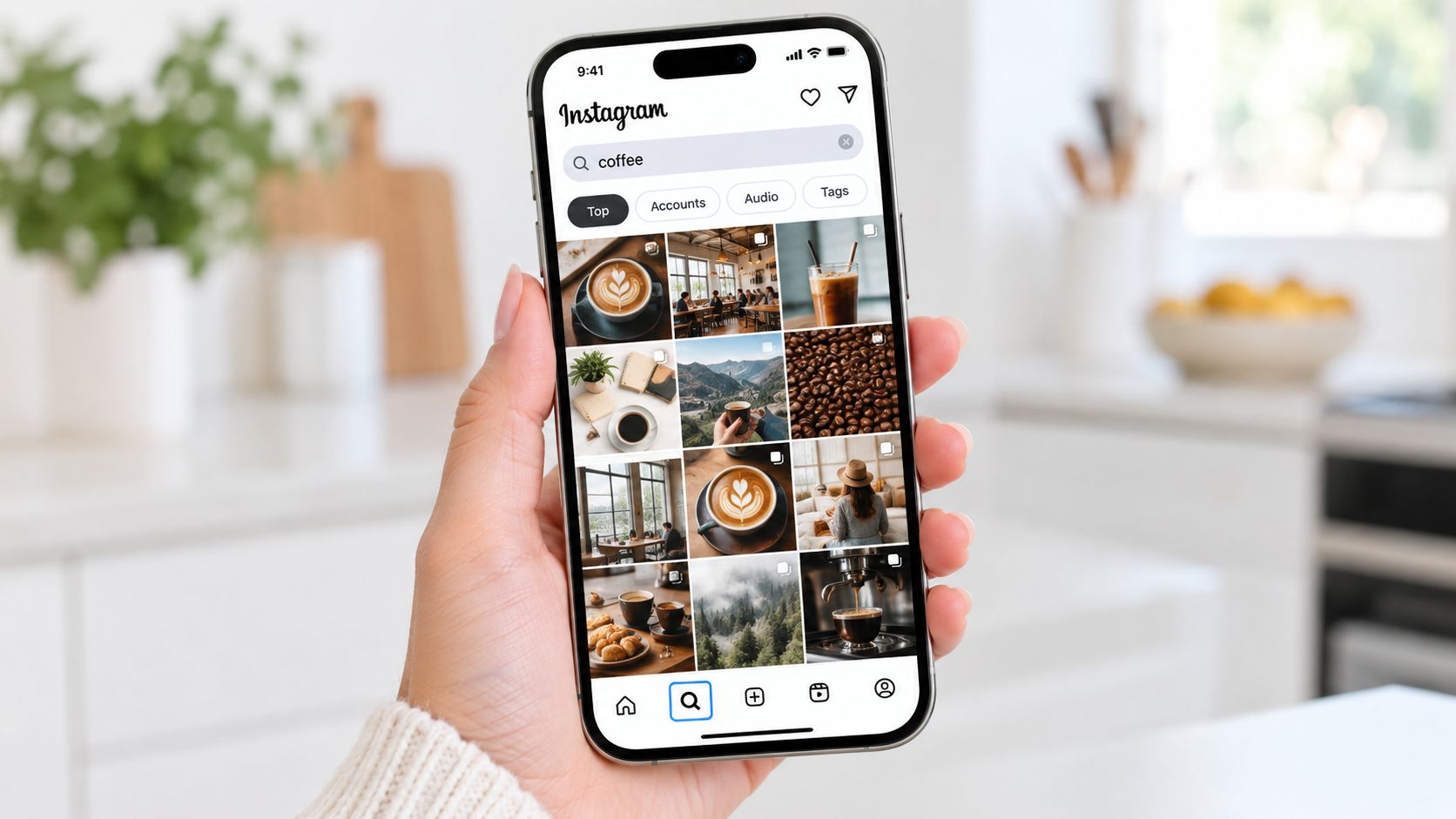
Open the Instagram app, tap the magnifying glass on the Explore tab, and type the term you want to test. Instagram can return matching accounts, audio, hashtags, and places, so the first thing you're looking at is not automatically the hashtag page. The official search behavior matters here, because a generic term can send you to the wrong result type before you ever inspect a tag page as Instagram explains.
Select the Tags chip, not Accounts or Reels, and then open the actual hashtag page. That one tap separates a real hashtag audit from a noisy browse session. On the page itself, scan Top and Recent separately. Top shows the long-running winners, while Recent tells you what's being published right now and whether the tag is currently flooded, stale, or active.
After a few searches, you'll start noticing patterns. Some tags return polished creator content, some are full of product promos, and some are so broad that the visible posts don't help you at all. That mix is the point, because the page itself is a market sample, not a popularity contest.
Desktop works too, just less efficiently. Search from Instagram's web interface when you're at a laptop, but keep in mind that the mobile app is still the cleaner place to audit quickly and compare multiple tags in sequence.
Search the page like an analyst, not a fan. If the result set doesn't answer who posts here, what they post, and whether buyers are present, move on.
For teams that need a broader workflow, the same logic is useful in tooling. MyMentions has a helpful piece on mymentions AI ranking insights that's more about AI visibility than Instagram, but the habit is the same, read the result surface before you decide what to publish.
Auditing the Results Page for Real Buyer Intent
A hashtag page only helps if you can grade what you see. Start with recency, then ask whether the visible accounts look like the audience you want, not just accounts that happen to post a lot. A tag can be “popular” and still be useless for a brand if the page is dominated by creators, resellers, or unrelated promo accounts.
Next, read the format mix. If the page is mostly Reels, that tells you the tag is being used in motion-first content. If it's mostly still images or carousels, the community around that tag may be educational, catalog-like, or more static.
Then read the language. The captions and on-screen text often show the actual problem people are trying to solve, which is more useful than the tag itself. A skincare team looking at #skincareroutine may see broad lifestyle content, while #sensitiveskincareroutine usually narrows the field toward a more specific need. A B2B SaaS team comparing #crm with #crmforagencies is doing the same thing, but in buyer language.
The last check is promotional saturation. If every visible post is pushing an offer, the tag may be crowded with sellers rather than buyers. That doesn't automatically make it bad, but it does change how you interpret the page.
The big trap is confusing accumulated supply with demand. Large tags can be enormous public indexes, not good signals of purchase intent. Recent third-party estimates place #love above 2.1 billion Instagram posts, while #instagood and #fashion each exceed 1 billion uses, which is exactly why broad tags can bury a post fast as Cropink reports.
Building a Shortlist with Phrase and Keyword Searches
The cleanest shortlist starts with the words your audience uses. Type the exact problem phrase, then try synonyms, local modifiers, and topic variants inside Instagram search, not just single-word tags. If a tag doesn't show useful results, the phrase around it often does.
That matters more now that Instagram removed the ability to follow hashtags in December 2024, while hashtag search stayed available for discovering related posts as reported here. In practice, you're not subscribing to a feed anymore. You're sampling current language, then saving your own shortlist for later checks.
Classify every candidate tag into one of five buckets, category, problem, audience, location, or campaign. That sounds basic, but it keeps random variants from crowding the final set. A tag that describes what the thing is belongs in a different bucket from a tag that describes who it's for or where it's used.
Under the current posting limit, that discipline matters even more. Instagram introduced a five-hashtag limit for posts and Reels in December 2025, replacing the old 30-tag allowance per reporting on creator communications. The right move is to keep the five tags that map most directly to the subject and audience, then stop trying to cover every adjacent term.
SleekPost's 2026 social media hashtag guide is useful here if you want a broader taxonomy while you build your own shortlist. The value isn't in copying its examples, it's in using a cleaner vocabulary for deciding what belongs in a real test.
Using Third-Party Tools and the Graph API Honestly
Third-party hashtag tools are fast, and that's their main advantage. They usually surface related terms, post counts, and rough difficulty-style scores, which is helpful when you need a first pass quickly. The trade-off is that the data is often estimated, stale, or scored through opaque methods, so those tools are better for narrowing options than for proving performance.
The more serious route is the Meta Instagram Graph API, if you have the team for it. You need the hashtag-search capability and successful App Review for live public-content access, then you resolve the hashtag identifier and request recent or top media. The API permits a maximum of 30 unique hashtag queries per Instagram Business account in a rolling seven-day period, so quota management matters according to Meta's documentation.
| Approach | Best for | Setup cost | Data freshness |
|---|---|---|---|
| Native search | Fast manual audits | Low | Real-time |
| Third-party tools | Quick shortlist building | Low to medium | Varies |
| Graph API | Repeatable team workflows | High | Live public data |
A sensible sampling split is to reserve roughly one-third of the quota for discovery, one-third for competitor or category benchmarking, and one-third for post-publication monitoring. If you don't need that level of rigor, don't force it. Save the engineering lift for teams that publish enough to justify the system.
If you want to compare how search, monitoring, and execution stack up in broader visibility workflows, the best share of voice guide for 2026 shows why measurement systems are only useful when they connect to action.
Measuring Whether the Hashtags Actually Worked
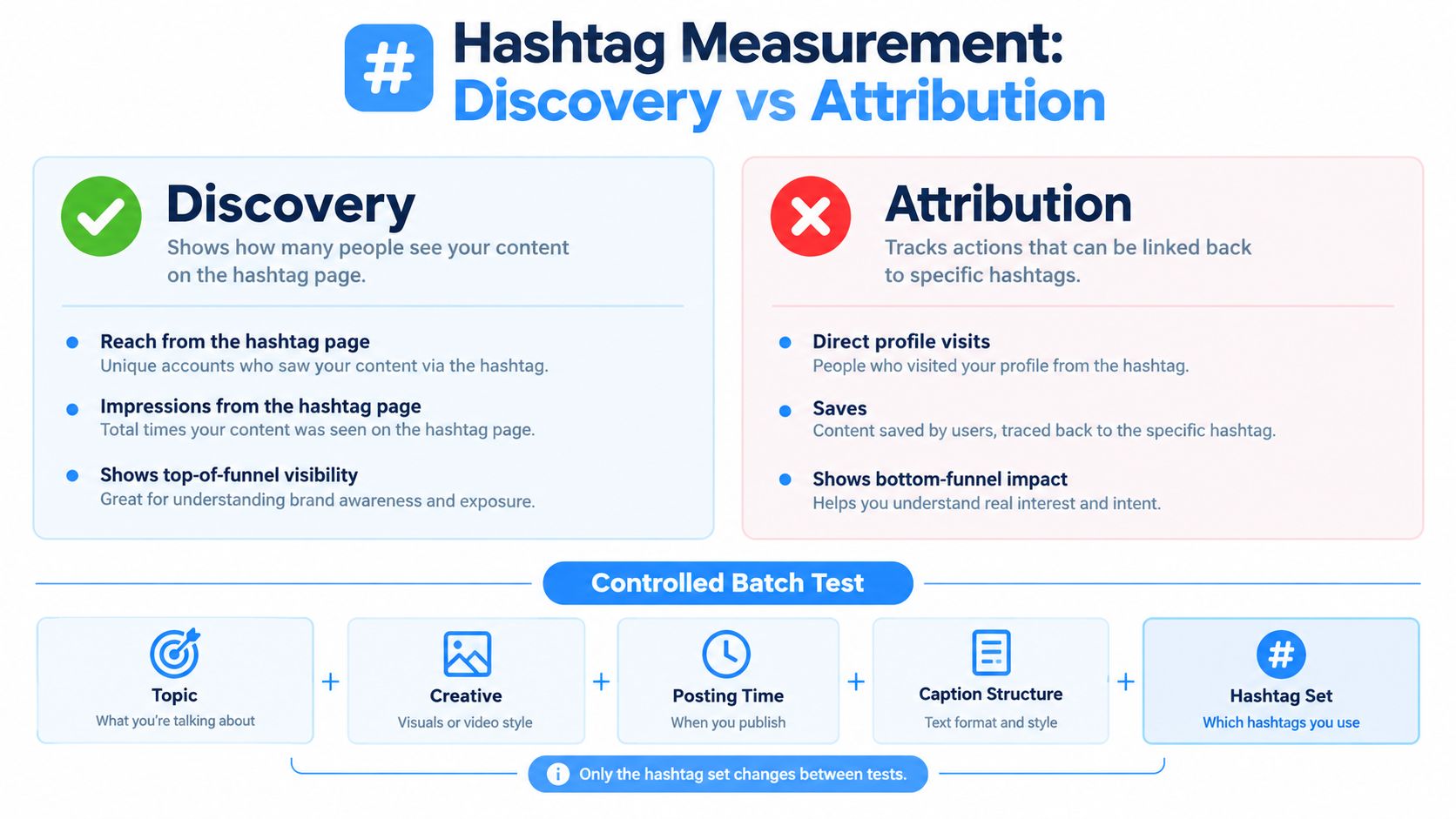
Discovery and attribution are not the same thing. A hashtag page can show you that people might see a post, but that doesn't prove the tag caused meaningful engagement or business results. The cleanest test is a controlled batch: keep topic, creative, posting time, and caption structure as consistent as possible, then vary only the hashtag set.
Track reach, impressions, profile visits, saves, shares, comments, and conversions after publication. Instagram's Post Insights also includes hashtag-attributed impressions as a separate diagnostic field, which is the number you want when you're checking whether a tag helped the post get seen. Treat every result as relative to a baseline, not as proof on its own.
Independent marketing compilations report figures such as 12.6% higher engagement for posts with at least one hashtag and nearly 79.5% greater reach for posts using 9 to 11 hashtags, but those are directional observations, not universal benchmarks as summarized by Sprout Social. They may reflect platform changes or sample bias, so don't build policy around them blindly.
Practical rule: keep a tag only when it produces qualified reach or downstream action. Likes alone are too weak to justify a slot.
Many teams go wrong under the five-tag limit. They keep broad tags because the numbers look busy, then wonder why the traffic isn't useful. Re-test by market and content format, because a winner in one niche or one creative style won't automatically transfer.
Operator Checklist and Common Questions
Operator checklist
- Search before you post. Run the hashtag through native search before it ever goes into a caption.
- Grade the results page. Check recency, audience fit, format mix, and promo saturation.
- Classify every tag. Separate category tags from problem, audience, location, and campaign terms.
- Keep the set tight. Under the current limit, use the few tags that map most directly to the post.
- Measure attributed results. Look at hashtag-attributed impressions, not just likes.
- Re-test regularly. What works in one market or format may not work in the next one.
The biggest mistakes are predictable. People chase post counts, mix unrelated tags to look broader, and treat search visibility as if it automatically means purchase intent. They also assume one winning set will travel across countries, verticals, and formats, which usually isn't true.
FAQ
Do hashtags still help on Instagram in 2026? Yes, but mostly as a classification and discovery signal, not a major reach engine.
How many hashtags should I use now? Use up to five, and only if each one earns its place.
Can I follow hashtags anymore? No, that monitoring method is gone, so use search and saved research instead.
How do I find niche hashtags for a small account? Search the exact words your buyers use, then check whether the results page looks like your target audience, not just a big public tag.
What should I do if a hashtag looks crowded? Treat it as a warning sign, then test a narrower phrase or a more specific audience tag.
If you want a cleaner way to connect Instagram research with real visibility work, OGTool helps brands turn search signals into ranked content, Reddit visibility, and measurable attribution. If your team wants more than a tag checklist, visit OGTool and see how tracked execution can sit behind the research.
Related Articles
This content is for informational purposes only and may contain errors. Please contact us to verify important details.